System Capabilities

Wexenleigh's Core Classification and Review Capabilities

An overview of the main capabilities available within the Wexenleigh information-organisation system. Each capability is described as it functions within the structured interface.

Four Capabilities

What the system makes available to users

Each capability described here reflects a function within the current interface. Descriptions distinguish what the system presents from what has not been independently confirmed.

01

Information Classification

The system assigns incoming information to defined categories based on content type and subject area. This classification layer is what makes the available content browsable and navigable within the interface. Each category carries a consistent label and a standard display format, so users can orient themselves quickly within any section.
02

Structured Content Review

Users can examine content within each classified section at their own pace. Items are presented in a consistent format, with contextual labels identifying their type and relevant grouping. Review tools support systematic examination without requiring users to navigate unstructured material or interpret inconsistent presentations.

03

Guided Access Pathway

Users who wish to access the system's full information range are guided through a structured process. This includes reviewing available documentation, submitting an enquiry, and receiving confirmation from the support team before access is extended. The pathway is designed to be clear and manageable, without unnecessary complexity.

04

Enquiry and Support Channel

A designated contact channel allows users to direct questions, access requests, and clarifications to the support team. Enquiries are reviewed individually and responded to as resources allow. The team may request additional information before providing a response; no outcome is assumed in advance.

Using the System

A structured approach to reviewing available information

The following steps describe a typical path through the Wexenleigh interface. Users may adapt this sequence to their own needs and the information areas they intend to examine.

Identify the relevant section

Use the system's category navigation to identify the information area most relevant to your purpose. Each section is labelled clearly, and the available content within it follows a consistent presentation format.

Examine the available content

Review the structured content within that section, using consistent labels and presentation markers to guide your examination. Items within a section share a common format, making comparison and sequential review straightforward.

Note any gaps or further questions

If the available information does not fully address your need, or if you want clarification on a particular area, use the enquiry channel to direct a question to the support team. Specific, clearly described questions receive more useful responses.

Submit an enquiry if required

The enquiry form on this site allows you to specify your request type and provide the relevant context. The support team will review your submission, may seek clarification, and will respond as available. Responses are provided by a member of the team, not by an automated system.

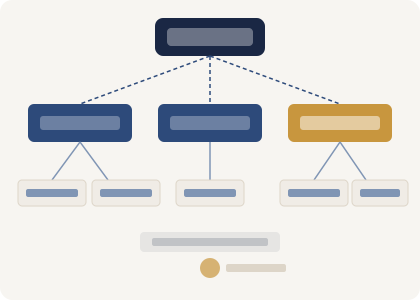
Hierarchy diagram showing how information flows from a root category through classification branches into specific subcategories

Classification Approach

How Wexenleigh structures the information hierarchy

The classification approach within Wexenleigh is designed to keep information navigable at every level. A root category provides the broadest organisation, with subcategories making progressively more specific groupings available. Users can move between levels without losing their place within the overall structure.

Each node in the hierarchy carries its own label and a consistent set of metadata, so the relationship between categories is always clear. This design supports both broad browsing and targeted examination of specific information areas.

Ready to examine the system further or send an enquiry?

Review the platform overview for a broader explanation of the system, or use the enquiry form to direct a question to the support team.